 Fundamentals Hub

You find out the SEC publishes financial data for every public company in the US, for free. Revenue, net income, total assets, cash flows, going back over a decade. You open the SEC EDGAR API documentation, craft a URL, hit it with curl, and get back a 2MB JSON blob with 47,000 lines. Now what?
This guide covers the SEC EDGAR API from a developer's perspective: which endpoints to use, how the data is structured, what the response actually means, and the gotchas that will waste your afternoon if nobody warns you first.
What SEC EDGAR Actually Offers Developers
- SEC EDGAR API
- A set of free, public JSON endpoints at data.sec.gov that serve structured financial data extracted from XBRL-tagged company filings.
- XBRL
- eXtensible Business Reporting Language. The tagging standard the SEC requires in financial filings, enabling machine-readable financial data.
- CIK
- Central Index Key. The SEC's unique 10-digit numeric identifier for each filing entity. Must be zero-padded in API URLs.
- Company Facts
- The primary SEC EDGAR endpoint. Returns every XBRL-tagged financial fact for a single company across all filings in one JSON response.
The SEC maintains a set of XBRL data APIs at data.sec.gov that aggregate financial facts from company filings, 10-K annual reports and 10-Q quarterly reports. These APIs are free, require no API key, and cover every company that files with the SEC: roughly 8,000+ active filers.
The data comes from XBRL tags embedded in each filing. When Apple files its 10-K, every number on the income statement, balance sheet, and cash flow statement is tagged with a standardized identifier like Revenues or NetIncomeLoss. The SEC extracts these tagged values and makes them queryable through three API endpoints.
Key facts before you start:
- No authentication required - the APIs are fully public
- Rate limit: 10 requests per second, enforced by IP address
- User-Agent header is mandatory - format:
CompanyName admin@company.com - Data format: JSON (no XML option for these endpoints)
- Coverage: All SEC filers, with XBRL data back to approximately 2009
The Three SEC EDGAR API Endpoints That Matter

Three endpoints cover all the financial data you need. Each one scopes the data differently: by company, by tag, or across all filers. If you need filing history instead of XBRL facts, use the separate data.sec.gov/submissions JSON guide for recent filings, accession numbers, and primary document URLs.
1. Company Facts (The Workhorse)
GET https://data.sec.gov/api/xbrl/companyfacts/CIK{cik10}.jsonReturns every XBRL fact ever reported by a company across all filings. One call gives you revenue, net income, assets, liabilities, cash flows, every tagged value, organized by taxonomy and tag name.
Example for Apple (CIK 0000320193):
curl -H "User-Agent: MyApp admin@example.com" \
  https://data.sec.gov/api/xbrl/companyfacts/CIK0000320193.json
This is the endpoint you'll use 90% of the time. A single response contains the complete financial history, so you can extract annual, quarterly, and TTM data from one request per company.
2. Company Concept (Single Tag Lookup)
GET https://data.sec.gov/api/xbrl/companyconcept/CIK{cik10}/us-gaap/{Tag}.jsonReturns all reported values for one specific XBRL tag. Useful when you only need a single metric:
curl -H "User-Agent: MyApp admin@example.com" \
  https://data.sec.gov/api/xbrl/companyconcept/CIK0000320193/us-gaap/Revenues.json
3. Frames (Cross-Company Snapshots)
GET https://data.sec.gov/api/xbrl/frames/us-gaap/{Tag}/{Unit}/{Period}.jsonReturns a single metric for every company that reported it in a given period. Want every filer's revenue for Q4 2024?
curl -H "User-Agent: MyApp admin@example.com" \
  https://data.sec.gov/api/xbrl/frames/us-gaap/Revenues/USD/CY2024Q4.json
The period format depends on the fact type: use CY#### for annual duration facts, CY####Q# for quarterly duration facts such as revenue, and CY####Q#I for instant facts such as balance sheet values at quarter-end. The Frames endpoint is powerful for screening and cross-company analysis.
Your First API Call: Pulling Apple's Financials
Fetch Apple's company facts and pipe it through a JSON formatter to see the structure:
curl -s -H "User-Agent: MyApp admin@example.com" \
  "https://data.sec.gov/api/xbrl/companyfacts/CIK0000320193.json" \
  | python -m json.tool | head -50
The response structure (simplified):
{
  "cik": 320193,
  "entityName": "Apple Inc.",
  "facts": {
    "us-gaap": {
      "Revenues": {
        "label": "Revenues",
        "description": "Amount of revenue recognized from goods sold...",
        "units": {
          "USD": [
            {
              "end": "2024-09-28",
              "val": 391035000000,
              "accn": "0000320193-24-000123",
              "fy": 2024,
              "fp": "FY",
              "form": "10-K",
              "filed": "2024-11-01"
            },
            {
              "end": "2023-09-30",
              "val": 383285000000,
              "accn": "0000320193-23-000106",
              "fy": 2023,
              "fp": "FY",
              "form": "10-K",
              "filed": "2023-11-03"
            }
          ]
        }
      },
      "NetIncomeLoss": { "..." : "..." },
      "Assets": { "..." : "..." }
    }
  }
}
Each fact entry contains:
val- the reported value (whole dollars for USD, not thousands or millions)end- the period end datefy/fp- fiscal year and fiscal period (FY, Q1, Q2, Q3)form- source filing type (10-K for annual, 10-Q for quarterly)filed- the date the filing was submitted to the SECaccn- the accession number, a unique identifier for the filing document
One detail that catches people: val is always in whole units. Apple's revenue of $391 billion shows up as 391035000000, not 391.035. There's no separate "scale" field.
Five Gotchas That Will Cost You Hours
The SEC EDGAR API is straightforward to call but deceptively hard to use reliably. These five issues trip up every developer who builds on this data.
1. CIKs Must Be Zero-Padded to 10 Digits
The API requires 10-digit CIKs with leading zeros. Apple's CIK is 320193, but the URL needs CIK0000320193. Miss the padding and you get a 404 with no helpful error message.
cik_padded = str(cik).zfill(10)
url = f"https://data.sec.gov/api/xbrl/companyfacts/CIK{cik_padded}.json"
To look up a CIK from a ticker, download https://www.sec.gov/files/company_tickers.json and build a local mapping. There is no ticker-to-CIK lookup endpoint.
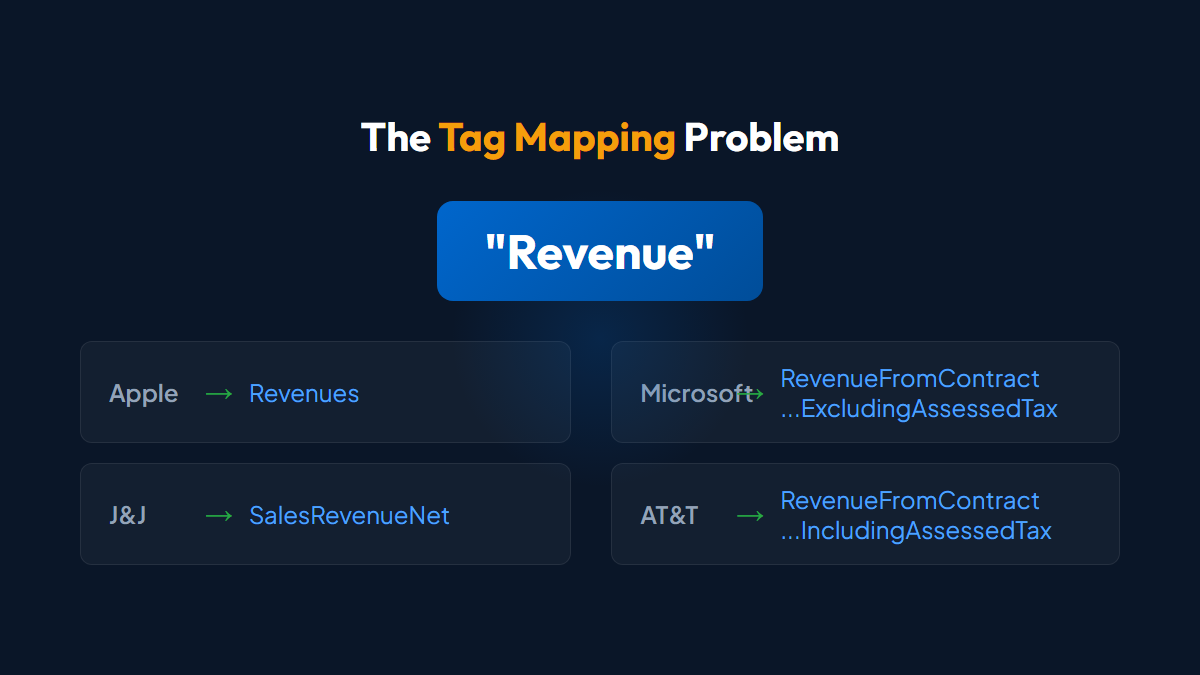
2. The Same Metric Uses Different Tag Names
This is the biggest frustration with SEC EDGAR data. "Revenue" might be tagged as:
| Company | XBRL Tag Used |
|---|---|
| Apple | Revenues |
| Microsoft | RevenueFromContractWithCustomerExcludingAssessedTax |
| Johnson & Johnson | SalesRevenueNet |
| AT&T | RevenueFromContractWithCustomerIncludingAssessedTax |
You need a semantic fallback map for each metric. Revenue alone has 4+ valid tags. Filter 10-K candidates to full-year durations. Keep semantic priority except for two scope proofs: (1) an exact-zero priority FY with another positive full-year revenue candidate (negative revenue is not zero); or (2) only when the nonnegative priority candidate does not reconcile, a reconciling alternative whose Q1-Q3 subtotal exceeds the priority FY. Otherwise keep priority.
3. Quarterly Flow Facts Can Be Year-to-Date
10-Q filings can contain both standalone-quarter and cumulative year-to-date facts for income statement items, while cash-flow items are commonly reported YTD. Classify each fact by its start and end dates instead of assuming every 10-Q value covers one quarter.
Normalize cumulative flows with Q2 = Q2_YTD - Q1 and Q3 = Q3_YTD - Q2_YTD. There is no Q4 10-Q. Derive the fiscal fourth quarter from the annual filing: Q4 = FY_10-K - Q1 - Q2 - Q3.
Balance sheet items are point-in-time snapshots and can be used as reported. This distinction trips up every developer building quarterly analysis for the first time.
4. The User-Agent Header Is Enforced
SEC blocks or throttles requests without a proper User-Agent. The expected format:
User-Agent: CompanyOrAppName ContactEmail@domain.comGeneric agents like Python-urllib/3.11 or curl/7.88.1 will fail silently or return intermittent 403 errors. Set a descriptive agent string and include a real email address.
5. No API Key Means No Higher Rate Limits
The SEC caps all requests at 10 per second by IP address. No registration, no premium tier, no way to get more. For bulk data needs, the SEC publishes a nightly companyfacts.zip archive containing all company facts data. It is currently about 1.4 GB compressed and grows over time. Download the archive once and process locally instead of making thousands of individual API calls.
Use ETag and If-None-Match headers on repeated requests. The SEC supports conditional requests, and a 304 Not Modified response saves bandwidth and counts toward your rate limit budget.
From Raw XBRL to Usable Financial Data
Pulling a response from the SEC EDGAR API takes one curl command. Building a reliable data pipeline on top of it takes weeks.
Here's a minimal Python example that extracts Apple's annual revenue:
import requests

CIK = "0000320193"
URL = f"https://data.sec.gov/api/xbrl/companyfacts/CIK{CIK}.json"
HEADERS = {"User-Agent": "MyApp admin@example.com"}

response = requests.get(URL, headers=HEADERS)
facts = response.json()["facts"]["us-gaap"]

# Merge multiple tags because companies can change tags over time
REVENUE_TAGS = [
    "Revenues",
    "SalesRevenueNet",
    "RevenueFromContractWithCustomerExcludingAssessedTax",
]

annual_by_end = {}
for tag in REVENUE_TAGS:
    usd_facts = facts.get(tag, {}).get("units", {}).get("USD", [])
    for entry in usd_facts:
        if entry.get("form") != "10-K" or entry.get("fp") != "FY":
            continue
        previous = annual_by_end.get(entry["end"])
        if previous is None or entry["filed"] > previous["filed"]:
            annual_by_end[entry["end"]] = entry

for entry in sorted(annual_by_end.values(), key=lambda x: x["end"], reverse=True)[:5]:
    print(f"{entry['end']}: ${entry['val']:,.0f}")
Output:
2025-09-27: $416,161,000,000
2024-09-28: $391,035,000,000
2023-09-30: $383,285,000,000
2022-09-24: $394,328,000,000
2021-09-25: $365,817,000,000
This minimal example merges annual tag history. Production selection keeps semantic priority except for two scope proofs: (1) an exact-zero priority FY with another positive full-year revenue candidate (negative revenue is not zero); or (2) only when the nonnegative priority candidate does not reconcile, a reconciling alternative whose Q1-Q3 subtotal exceeds the priority FY. Otherwise keep priority.
That covers revenue for one company. The full pipeline requires handling 23+ financial fields, 50+ tag variants, three period types, per-field duration classification for quarterly flows, Q4 derivation from the annual filing, derived calculations (free cash flow = CFO minus capex, with capex normalized as a positive spend), and edge cases like companies that switch tags between filings or report in non-USD currencies.